







Things You Should Know About Sun Protection

Summer is here and it’s warming up outside, we’re shedding our layers of clothing and exposing more skin. But, as many of the skin-protection campaigns are saying, we need to practice safe sun. So I have taken the time to put together a list of what I believe to be good safe sun practices. Here are what I believe is the top 10 most important sun-care facts that we should all know.Maybe after you read these facts you will consider wearing a good SPF sun protection.
1. Forty percent of Americans do not wear sunscreen.
2. One in five Americans will get some form of skin cancer—men especially, since they don’t use makeup and moisturizers with SPF like women do.
3. A sunblock is opaque and contains physical filters that create a shield-like barrier. A sunscreen is transparent on your skin. Although both protect against UVA and UVB rays, sunblock is said to be safer since you don’t have to apply it as often. Great for those who don’t reapply after washing hands, during long-session in the sun and post-water.
4. Chemical sun filters absorb into your skin and possibly into your bloodstream. Some deem them to be less safe as they are also more likely to irritate your skin. Three of the most common are avobenzone, oxybenzone and octinoxate.
5. Physical sun filters sit on top of your skin, thus creating a white or purple-ish hue and are considered the safer. Two physical filters are zinc oxide and titanium oxide.
6. While chemical sunscreens take around 25 minutes to work, physical sunblock formulas get to work instantly.
7. Don’t buy into the spray sunscreen hype. You won’t get the max coverage you need and most of it will blow away in the wind! Lotion is best—opt for an oil-free formula for a more comfortable feeling on your skin.
8. Wearing a dark, wide-brimmed hat is the equivalent to around an SPF 33. Plus it will protect your hair color from fading and prevent scalp sunburn.
9. Don’t be deceived by higher SPF numbers—the difference between is pretty negligible. Aim for SPF 50 max.
10. Stress? Age? Nope! The biggest factors of visible skin damage are UVA and UVB rays.
Is This The Future, Car or Plane?
Is it a car or a plane? The Terrafugia, a small airplane that can drive on roads and has been billed as the first “flying car,” is now one step closer to becoming street- and sky-legal. The vehicle has cleared a Federal Aviation Administration (FAA) regulatory hurdle for craft classification by weight. A full-fledged production prototype might be just around the corner, according to multiple reports. At issue was Mass.-based company Terrafugia wanting its Transition vehicle to be classified as a “Light Sport Aircraft” by the FAA so people eager to fly it would need only 20 hours of flying time.
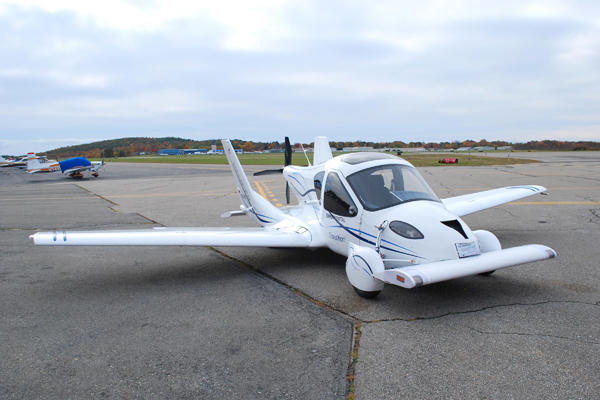
Yet the two-seater vehicle came in 110 pounds (50 kilograms) overweight in accommodating roadworthy-assuring safety items such as crumple zones. The FAA said that so long as customers are advised about this extra weight, the car-plane hybrid can be sold. The Terrafugia completed its maiden voyage last March in upstate New York. According to its maker, the Terrafugia can transform from a roadable vehicle that can hit a highway speed of 65 mph to a winged aircraft in 30 seconds. The plane version can cruise at about 115 mph (185 kph) and cover about 400 miles (644 kilometers) worth of turf before needing a refill of regular unleaded gas.
The price of a Terrafugia is expected to be around $200,000 and deliveries could start next year, assuming the vehicle passes crash tests. The company has envisioned its vehicle as finding a home with amateur pilots who live near air fields, but as any Jetsons’ fan knows, flying cars might well be the wave of the future.
How to Secure Your Wireless Home Network
A few techniques a user can use to secure his or her 802.11b/g /n wireless home network. Securing a wireless network is very important because if you don’t, your neighbors can not only borrow your Internet connection, but also access your files. Even worse, hackers can use your internet connection to upload illegal materials, and the FBI will ring your bell… 
1. Enable encryption on your access point. Using 128-bit encryption or higher makes your Wireless Network more secure. WEP and WPA are entirely different encryption schemes. WEP has been proven insecure and can be cracked in a few minutes using free utilities that can be downloaded from the Internet. Using at least WPA is recommended, because it is much more secure, but is sometimes a bit harder to set up correctly than WEP is, and isn’t completely secure. Some older access points or wireless cards do not support WPA2. If you have one of these, it is recommended that you purchase a newer one that supports WPA2, depending on how important you consider your security.
2. Set the router access password. Anybody who gains access to the router configuration settings can disable the security you have set up. If you forget the password, most routers have a hardware reset that will restore all of the settings to factory defaults. The best option is to use a random sequence of the maximum length of characters – you only have to type that once, so it is not a big thing. When you connect to the router via LAN cable while setting it up, you can copy and paste the password onto the router and onto your local setting, so you never need to type it again.
- Use a secure password. Don’t use easily guessed passwords for your WPA2 or router access passwords, such as “ABC123”, “Password”, or a string of numbers in order. Use something hard to guess that contains both upper and lowercase letters as well as numbers. Special characters such as !@#$% are not supported by some routers. The longer the key, the better, although the WPA2 key has a minimum and maximum length. Try to make a little mental effort — good passwords might be hard to remember, but they are harder to crack.
- If you use a weak key then even WPA and WPA2 can be easily cracked within a day using a combination of special precomputed tables and dictionary attacks. The best way to generate a secure key is to use an offline random number generator or write the entire alphabet in uppercase and lowercase and numbers 0-9 on separate pieces of paper, mix the paper up and randomly pick up pieces and return them, mixing them up again each time; each character you pull out becomes a character in your key. You can also try throwing a pair of dice and using the resulting numbers as your password.
3. Change the Service Set Identifier (the network name or “SSID”) from the default to something unique. A default SSID indicates to hackers that the network was set up by a novice and that other options (such as the password) are also left as the default. Use a name you can remember and identify, as the SSID has no influence on the security of your network (not even if you choose not to broadcast it).
4. Change the Service Set Identifier (the network name or “SSID”) from the default to something unique. A default SSID indicates to hackers that the network was set up by a novice and that other options (such as the password) are also left as the default. Use a name you can remember and identify, as the SSID has no influence on the security of your network (not even if you choose not to broadcast it).
5. Enable MAC Address filtering on your Access Point or router. A MAC (not to be confused with the computer model ‘Mac’) address is a code unique to every wireless networking card in existence. MAC Address filtering will register the hardware MAC Address of your networked devices, and only allow devices with known MAC Addresses to connect to your network. However, hackers can clone MAC addresses and still enter your network, so MAC address filtering should not be used in place of proper WPA2 encryption.
6. Don’t disable the ‘SSID Broadcast. Do not disable the ‘SSID Broadcast’ feature of your Access Point or router. This seems counter-intuitive, but it is actually a bad idea.[3] Although this would make your network invisible to your neighbors, any determined hacker can still sniff out your SSID; and you are implicitly forcing your computer to shout out your SSID anywhere you are, while it is trying to connect to it. Anyone could then impersonate your router with that SSID, and get your credentials that way.
7. Disable remote login. The first router worm brute forces its way into the router in this manner. Most default usernames are set to Admin. It isn’t hard for a virus/worm to crack the password if the username is known. The good thing is that routers normally have this disabled by default. Be sure to confirm that it is disabled when you first set up your router and periodically thereafter. If you need to update your router setting remotely, only set up access for the time you are going to be connected.
8. Disable wireless administrating. Finally, change the setting that allows administrating the router through a wireless connection to ‘off’ (meaning that you need to connect with a LAN cable for administration). This disables any wireless hacking into the router! (aside from breaking into your house)

Recent Comments